¶ Notices
Notices in WCS serve as internal announcements that are only visible to your site's members, and so cannot be seen on any publicly accessible sections.
Notices can be posted by Site Administrators, and are set per User Group, so you can tailor certain Notices to only be shown to certain Groups of Users.
When a Notice is posted, Users to whom it is relevant will be notified by email, and the notice will be visible in a section of their Welcome Page which is shown when they first log in:
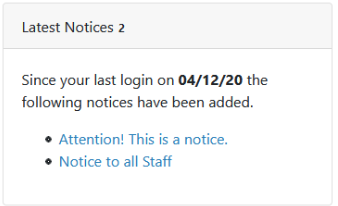
The full Notice content can be viewed by clicking on the Notice title in this section:

Notices can also be viewed in the dedicated Notices section, accessed via the Main Navigation Menu and clicking on Members Area > Notices.
¶ Notice Section
All Notices are managed through the Notices Section page.
This page is viewable by all Members, although only Site Administrators will be able to Add/Edit/Delete Notices.

- Add Notice: Add a new Notice to display to specific User Groups. (See: Adding a Notice).
- Help: Access the relevant section of WCS Online Help.
- Notice Title: The title of the listed notice. Click on this will allow you to view the notice in its entirety.
- Date Added: The date the Notice was added to the site.
- Posted By: The User who posted the Notice.
- Edit Notice: Allows the Notice's Title, Content, and targeted User Groups.
- Delete Notice: Deletes the Notice from the site.
Note: After saving an edited Notice, emails to the relevant Users will not be resent. An email is only sent when adding a Notice for the first time.
¶ Adding a Notice
-
To add a notice, ensure your User Account has Site Administrator access, and go to the main Notices section, which can be accessed through the Main Navigation Menu, by clicking Members Area > Notices.
-
Click on the Add Notice button
 at the top of the list of current Notices.

- Fill in the form with the details of your Notice:
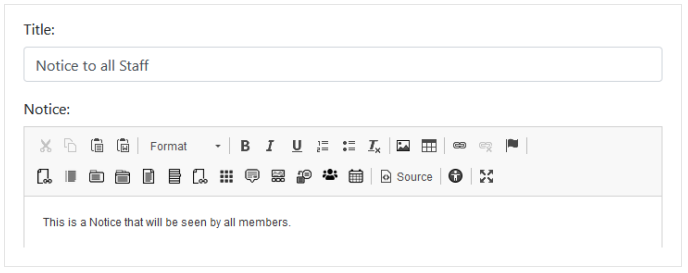
Title: The title of the Notice that will be shown on the Welcome Page and Notices section of relevant Users.
Notice: The content of your Notice.
Notice Category: The targeted User Groups for the Notice in question. The Notice will only appear to those Users who have been assigned to any User Groups selected here.
- Click the Add Notice button
 at the bottom of the form, to add the Notice with your chosen content and options.
Users in the targeted User groups will receive an email notification, and it will be visible on their Welcome Page, and Notices sections.